Taylor Series Exercise – Method 3

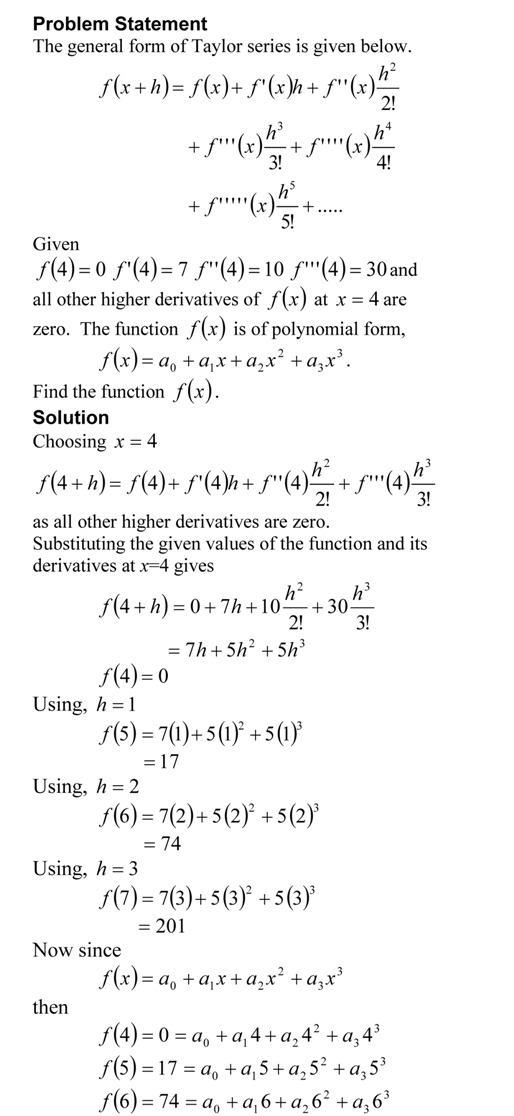
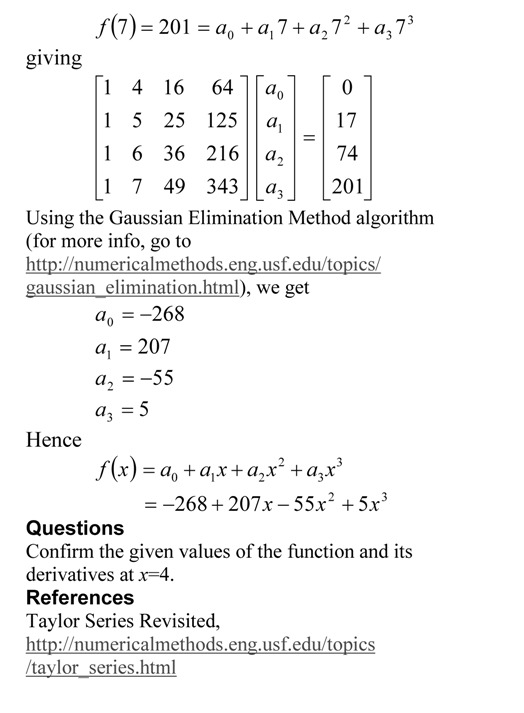
Taylor series is an important concept for learning numerical methods – not only for understanding how trigonometric and transcendental functions are calculated by a computer, but also for error analysis in numerical methods. I asked the question below in the first test in the course, and half of the students did not get to the final answer. In a previous blog, I showed you the method that most instructors would use. See how some students approached (another approach) the problem.

Taylor Series Exercise Method 3

The pdf file of the solution is also available.

This post is brought to you by

Subscribe to the blog via a reader or email to stay updated with this blog. Let the information follow you.
Taylor Series Exercise – Method 2

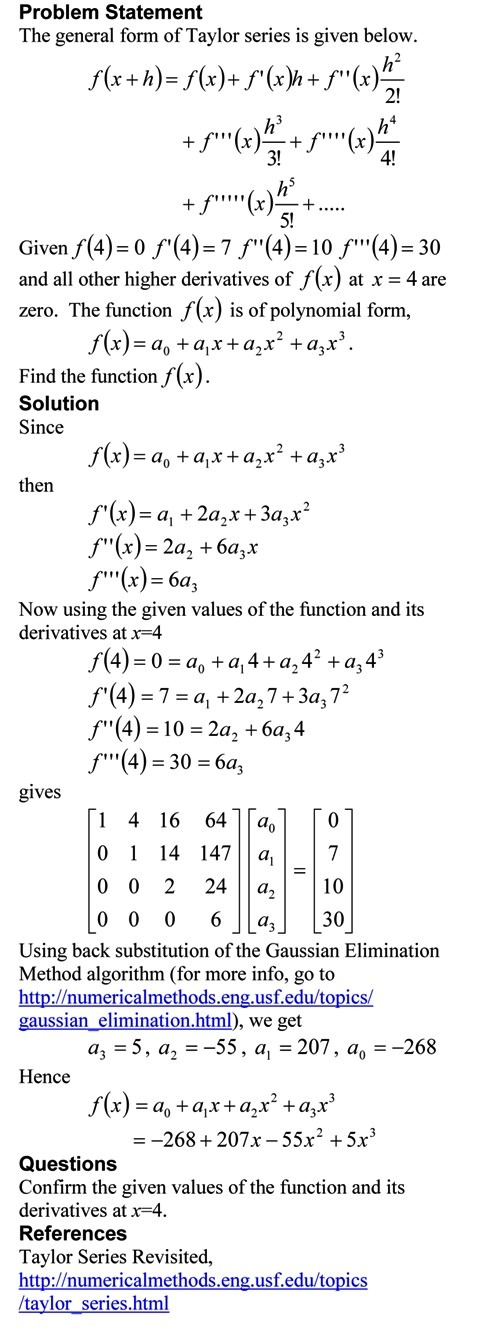
Taylor series is an important concept for learning numerical methods – not only for understanding how trigonometric and transcendental functions are calculated by a computer, but also for error analysis in numerical methods. I asked the question below in the first test in the course, and half of the students did not get to the final answer. In a previous blog, I showed you the method that most instructors would use. See how some students approached the problem.

Taylor Series Exercise Method 2

The pdf file of the solution is also available.

This post is brought to you by

Subscribe to the blog via a reader or email to stay updated with this blog. Let the information follow you.
Taylor Series Exercise – Method 1

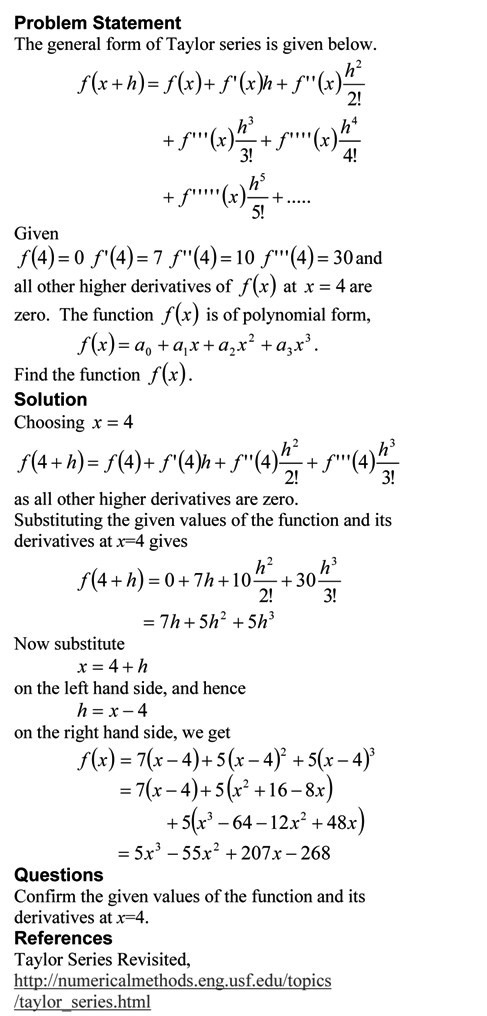
Taylor series is an important concept for learning numerical methods – not only for understanding how trigonometric and transcendental functions are calculated by a computer, but also for error analysis in numerical methods.  I asked the question below in the first test in the course, and half of the students did not get to the final answer.

Taylor Series Exercise Method 1

The pdf file of the solution is also available.

This post is brought to you by

Subscribe to the blog via a reader or email to stay updated with this blog. Let the information follow you.
Example: Solving a first order ODE by Laplace transforms

I have a audiovisual digital lecture on YouTube that shows the use of Euler’s method to solve a first order ordinary differential equation (ODE).  To show the accuracy of Euler’s method,  I compare the approximate answer to the exact answer.  A YouTube viewer asked me: How did I get the exact answer?

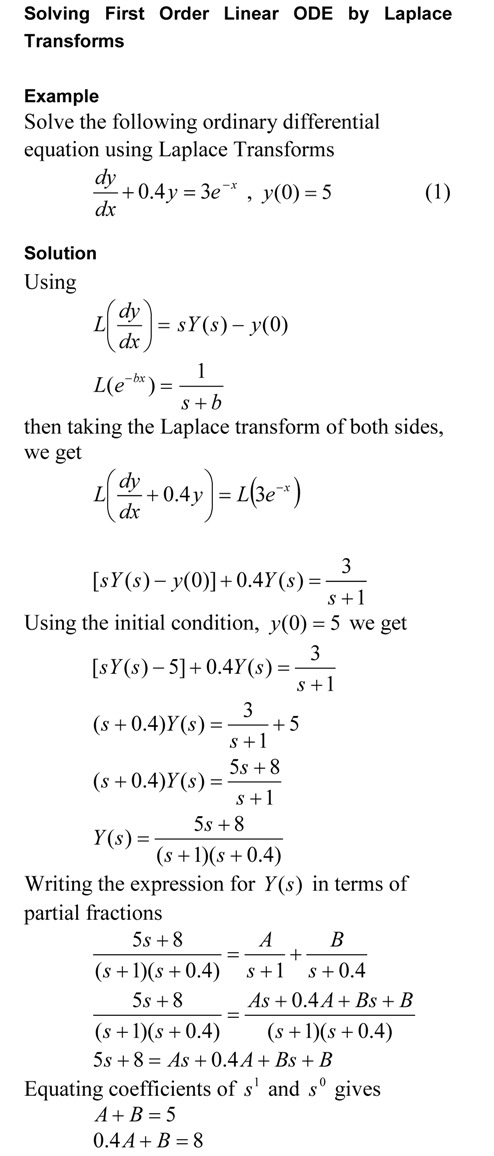
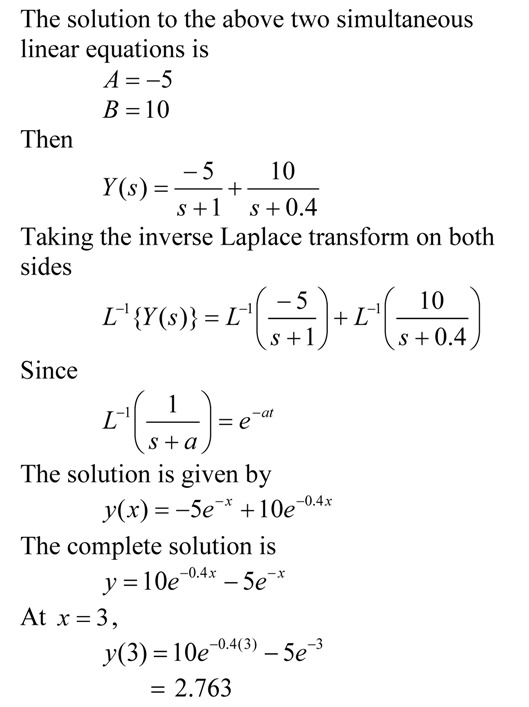
In this blog, I use the Laplace transform technique to find the exact answer to the ODE.  In a previous blog, I showed how to find the exact answer to the ODE by the classicial solution technique.

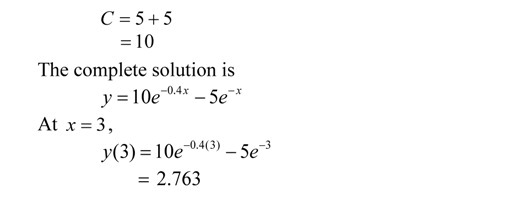
Solving First Order Linear ODE by Laplace Transform Solution TechniqueSolving First Order Linear ODE by Laplace Transform Solution Technique

The pdf file of the solution is also available.

Classical Solution Technique to Solve a First Order ODE

I have a audiovisual digital lecture on YouTube that shows the use of Euler’s method to solve a first order ordinary differential equation (ODE).  To show the accuracy of Euler’s method,  I compare the approximate answer to the exact answer.  A YouTube viewer asked me: How did I get the exact answer?

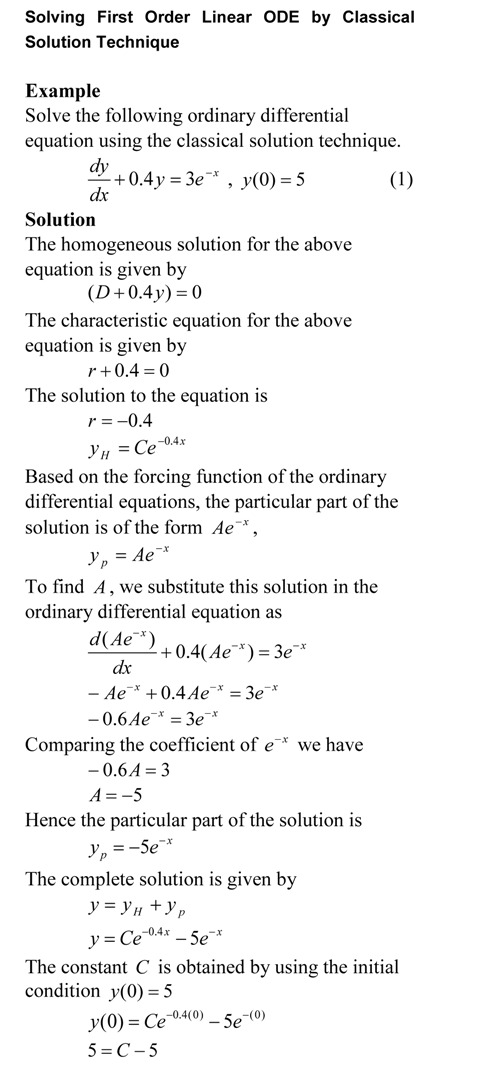
In this blog, I use the classical solution technique to find the exact answer to the ODE.  In a previous blog, I showed how to find the exact answer to the ODE by the integrating factor method.

Solving First Order Linear ODE by Classical Solution TechniqueSolving First Order Linear ODE by Classical Solution Technique

The pdf file of the solution is also available.

Example: Solving First Order Linear ODE by Integrating Factor

I have a audiovisual digital lecture on YouTube that shows the use of Euler’s method to solve a first order ordinary differential equation (ODE).  To show the accuracy of Euler’s method,  I compare the approximate answer to the exact answer.  A YouTube viewer asked me: How did I get the exact answer?

In this blog, I use the integrating factor method to find the exact answer, because that is the method the viewer was using to solve the ODE exactly.  So here it is and in two future blogs, I will show the same example being solved by 1) Laplace transforms and 2) the classical (complementary + particular) solution techniques.
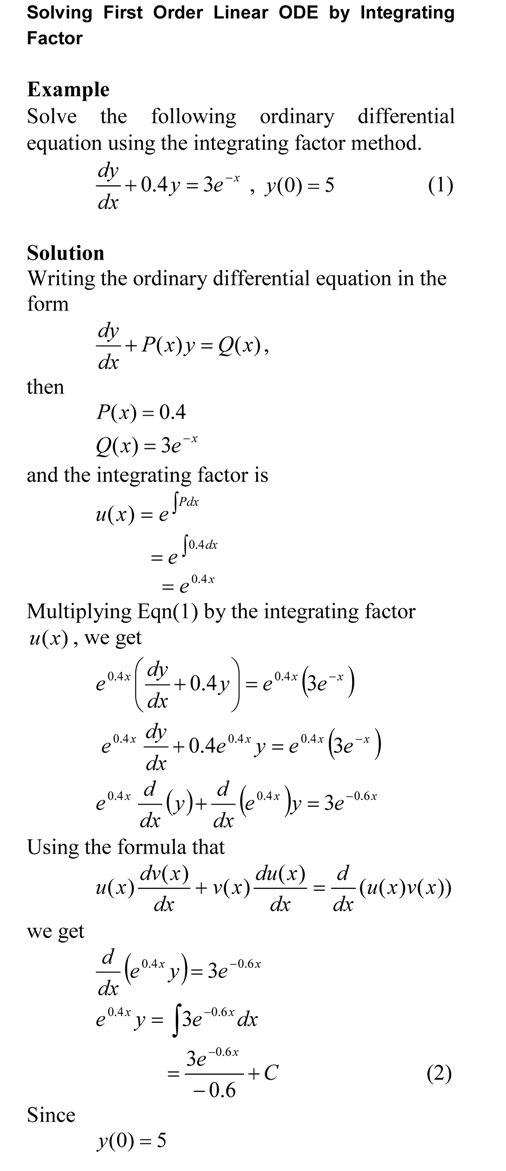
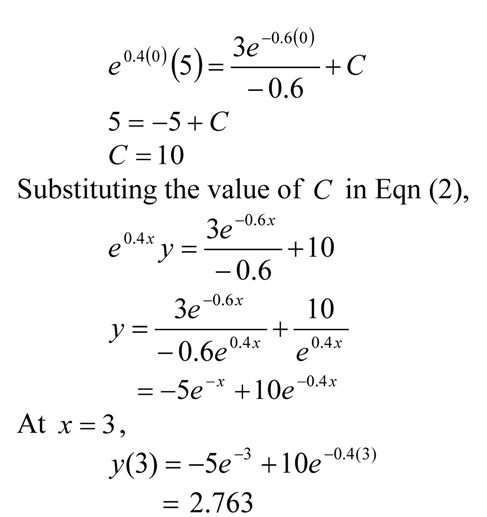
Solving First Order Linear ODE by Integrating Factor

The pdf file of the solution is also available.

This post is brought to you by

Subscribe to the blog via a reader or email to stay updated with this blog. Let the information follow you.
2010 in review

The stats helper monkeys at WordPress.com mulled over how this blog did in 2010, and here’s a high level summary of its overall blog health:

Healthy blog!

The Blog-Health-o-Meter™ reads Wow.

Crunchy numbers

Featured image

A helper monkey made this abstract painting, inspired by your stats.

The Louvre Museum has 8.5 million visitors per year. This blog was viewed about 79,000 times in 2010. If it were an exhibit at The Louvre Museum, it would take 3 days for that many people to see it.

In 2010, there were 13 new posts, growing the total archive of this blog to 89 posts. There were 3 pictures uploaded, taking up a total of 1mb.

The busiest day of the year was October 28th with 441 views. The most popular post that day was MATLAB code for bubble sort.

Where did they come from?

The top referring sites in 2010 were nm.mathforcollege.com, autarkaw.com, newtonexcelbach.wordpress.com, google.com, and en.wordpress.com.

Some visitors came searching, mostly for bubble sort matlab, polynomial interpolation matlab, matlab solve equation, interpolation matlab, and spline matlab.

Attractions in 2010

These are the posts and pages that got the most views in 2010.

1

MATLAB code for bubble sort November 2009
1 comment

2

How do I solve a nonlinear equation in MATLAB? April 2009
7 comments

3

How do I differentiate in MATLAB? March 2009
1 comment

4

A Matlab program for comparing Runge-Kutta methods August 2008
4 comments and 1 Like on WordPress.com,

5

How do I do polynomial interpolation in MATLAB June 2009
1 comment

Reading an excel file in MATLAB

Recently I taught a volunteer class to professional engineers on MATLAB.  Two of the most requested items of interest were
1. How do I read an excel file?
2. How do I do curve fitting?

We address the first question here.  It is easy to read an excel file with the xlsread command but what do you with it once the file has been assigned.  So we took a simple example of an excel spreadsheet where the first column consists of a student number and the second column has the examination scores of the students.  You are asked to find the highest score.

The MATLAB program link is here.
The HTML version of the MATLAB program is here.
The Excel file used in the MATLAB program is here

It is better to download (right click and save target) the program as single quotes in the pasted version do not translate properly when pasted into a mfile editor of MATLAB or you can read the html version for clarity and sample output.

%% READING AN EXCEL SPREADSHEET IN MATLAB
% Language : Matlab 2008a
% Authors : Autar Kaw
% Last Revised : December 12, 2010
% Abstract: This program shows you how to read an excel file in MATLAB
% The example has student numbers in first column and their score in the
% second column
clc
clear all
disp(‘This program shows how to read an excel file in MATLAB’)
disp(‘Matlab 2008a’)
disp(‘Authors : Autar Kaw’)
disp(‘Last Revised : December 12, 2010’)
disp(‘http://nm.mathforcollege.com’)
disp(‘  ‘)

%% INPUTS
% We have two column data and it has headers in the first row.
% That is why we read the data from A2 to B32.
A=xlsread(‘c:\users\grades.xls’,’A2:B32′);
disp (‘The data read from the excel spreadsheet is’)
disp(A)
disp(‘  ‘)
%% SOLUTION
% Finding the number of rows and columns
sizem=size(A);
rows_A=sizem(1);
cols_A=sizem(2);
% Assigning the scores to a vector called score
for i=1:1:rows_A
    score(i)=A(i,2);
end
% Using the max command to find the maximum score
% HW: Write your own function “max”
maxscore=max(score);
% Finding which student got the highest score
for i=1:1:rows_A
   if score(i)==maxscore
       student_no=i;
       break;
   end
 % HW: What if more than one student scored the highest grade??
end
%% OUTPUT
disp(‘  ‘)
disp (‘OUTPUT’)
fprintf(‘Student Number# %g scored the maximum score of %g’,…
    student_no,maxscore)
disp(‘ ‘)

This post is brought to you by

Subscribe to the blog via a reader or email to stay updated with this blog. Let the information follow you.
Inverse error function using interpolation

In the previous post, http://autarkaw.wordpress.com/2010/09/01/using-int-and-solve-to-find-inverse-error-function-in-matlab/, we found the inverse error function by using the integral and solve MATLAB functions.  In this blog, we find the inverse error function by using interpolation.

The value of erf(x) is given at discrete data points of x, and we use spline interpolation to find the value of x at a given value of erf(x).  The given data points of (x,erf(x)) are (0,0), (0.1,0.1125), (0.25,0.2763), (0.75,0.7112), (1.0,0.8427), (1.5,0.9661), (2.0,0.9953), (5.0,1.000). 

It is better to download (right click and save target) the program as single quotes in the pasted version do not translate properly when pasted into a mfile editor of MATLAB or you can read the html version for clarity and sample output.

%% FINDING INVERSE ERROR FUNCTION
% In a previous blog at autarkaw.wordpress.com (Sep 1, 2010), we set up a
% nonlinear equation to find the inverse error function.
% In this blog, we will solve this equation
% by using interpolation.
% The problem is given at
% http://nm.mathforcollege.com/blog/inverseerror.pdf
% and we are solving Exercise 2 of the pdf file.

%% TOPIC
% Finding inverse error function

%% SUMMARY

% Language : Matlab 2008a;
% Authors : Autar Kaw;
% Mfile available at
% http://nm.mathforcollege.com/blog/inverse_erf_interp_matlab.m;
% Last Revised : October 4 2010
% Abstract: This program shows you how to find the inverse error function
% using interpolation
clc
clear all

%% INTRODUCTION

disp(‘ABSTRACT’)
disp(‘   This program shows you how to’)
disp(‘   find the inverse error function’)
disp(‘ ‘)
disp(‘AUTHOR’)
disp(‘   Autar K Kaw of http://autarkaw.wordpress.com’)
disp(‘ ‘)
disp(‘MFILE SOURCE’)
disp(‘ http://nm.mathforcollege.com/blog/inverse_erf_interp_matlab.m’)
disp(‘  ‘)
disp(‘PROBLEM STATEMENT’)
disp(‘ http://nm.mathforcollege.com/blog/inverseerror.pdf  Exercise 2′)
disp(‘ ‘)
disp(‘LAST REVISED’)
disp(‘   October 4, 2010’)
disp(‘ ‘)

%% INPUTS
% Value of error function
erfx=0.1125;
% Table of erf(x) vs x
xx=[0  0.1  0.25  0.75  1.0  1.5  2.0  5.0];
erfxx=[0  0.1125  0.2763  0.7112  0.8427  0.9661  0.9953  1.0000];

%% DISPLAYING INPUTS

disp(‘INPUTS’)
fprintf(‘ Inverse error function is to be found for= %g’,erfx)
disp(‘  ‘)
disp(‘ Given erf(x) vs x values’)
disp(‘_______________________’)
disp(‘    x          erfx  ‘)
disp(‘________________________’)
dataval=[xx;erfxx]’;
disp(dataval)

%% CODE
if erfx>1.0 | erfx<0
    disp(‘Invalid value. erf(x) only takes values in [0,1] range’)
else
inverse_erf=interp1(erfxx,xx,erfx,’cubic’);
%% DISPLAYING OUTPUTS

disp(‘OUTPUTS’)
fprintf(‘ Value of inverse error func from this mfile is= %g’,inverse_erf)
fprintf(‘ \n Value of inverse error func from MATLAB is    = %g’,erfinv(erfx))
disp(‘  ‘)
end

__________________________________________________

This post is brought to you by

Holistic Numerical Methods: Numerical Methods for the STEM undergraduate at http://nm.mathforcollege.com,
the textbook on Numerical Methods with Applications available from the lulu storefront,
the textbook on Introduction to Programming Concepts Using MATLAB, and
the YouTube video lectures available at http://nm.mathforcollege.com/videos

Subscribe to the blog via a reader or email to stay updated with this blog. Let the information follow you.
Using int and solve to find inverse error function in MATLAB

In the previous post, http://autarkaw.wordpress.com/2010/08/24/finding-the-inverse-error-function/, we set up the nonlinear equation to find the inverse of error function.  Using the int and solve MATLAB commands, we write our own program to find the inverse error function.

It is better to download (right click and save target) the program as single quotes in the pasted version do not translate properly when pasted into a mfile editor of MATLAB or you can read the html version for clarity and sample output.

%% FINDING INVERSE ERROR FUNCTION
% In a previous blog at autarkaw.wordpress.com (August 24, 2010),
% we set up a nonlinear equation to find the inverse error function.
% In this blog, we will solve this equation.
% The problem is given at
% http://nm.mathforcollege.com/blog/inverseerror.pdf
% and we are solving Exercise 1 of the pdf file.

%% TOPIC
% Finding inverse error function

%% SUMMARY

% Language : Matlab 2010a;
% Authors : Autar Kaw;
% Mfile available at
% http://nm.mathforcollege.com/blog/inverse_erf_matlab.m;
% Last Revised : August 27, 2010
% Abstract: This program shows you how to find the inverse error function
clc
clear all

%% INTRODUCTION

disp(‘ABSTRACT’)
disp(‘   This program shows you how to’)
disp(‘   find the inverse error function’)
disp(‘ ‘)
disp(‘AUTHOR’)
disp(‘   Autar K Kaw of http://autarkaw.wordpress.com’)
disp(‘ ‘)
disp(‘MFILE SOURCE’)
disp(‘   http://nm.mathforcollege.com/blog/inverse_erf_matlab.m’)
disp(‘  ‘)
disp(‘PROBLEM STATEMENT’)
disp(‘   http://nm.mathforcollege.com/blog/inverseerror.pdf’)
disp(‘        Exercise 1’)
disp(‘ ‘)
disp(‘LAST REVISED’)
disp(‘   August 27, 2010’)
disp(‘ ‘)

%% INPUTS
% Value of error function
erfx=0.5;

%% DISPLAYING INPUTS

disp(‘INPUTS’)
fprintf(‘ The value of error function= %g’,erfx)
disp(‘  ‘)
disp(‘  ‘)

%% CODE
syms t x
inverse_erf=solve(int(2/sqrt(pi)*exp(-t^2),t,0,x)-erfx);
inverse_erf=double(inverse_erf);
%% DISPLAYING OUTPUTS

disp(‘OUTPUTS’)
fprintf(‘ Value of inverse error function from mfile is= %g’,inverse_erf)
fprintf(‘\n Value of inverse error function using erfinv is= %g’,erfinv(erfx))
disp(‘  ‘)

___________________________________________________

This post is brought to you by

Holistic Numerical Methods: Numerical Methods for the STEM undergraduate at http://nm.mathforcollege.com,
the textbook on Numerical Methods with Applications available from the lulu storefront,
the textbook on Introduction to Programming Concepts Using MATLAB, and
the YouTube video lectures available at http://nm.mathforcollege.com/videos

Subscribe to the blog via a reader or email to stay updated with this blog. Let the information follow you.