Printer cuts off MATLAB code and text

When you print MATLAB code or the published form of the code, you may find the code or the comments getting cut off.  The solution to these problems is given at several places in MATLAB blogs and documentation.  In this blog, I have summarized what to do as the issues of code getting cut off falls into three categories
 

___________________________________________

This post is brought to you by Holistic Numerical Methods: Numerical Methods for the STEM undergraduate at http://nm.mathforcollege.com, the textbook on Numerical Methods with Applications available from the lulu storefront, the textbook on Introduction to Programming Concepts Using MATLAB, and the YouTube video lectures available at http://nm.mathforcollege.com/videos.  Subscribe to the blog via a reader or email to stay updated with this blog. Let the information follow you.
Differentiating a Discrete Function with Equidistant Points

Many students ask me how do I do this or that in MATLAB.  This is a new addition to the “How do I do that in MATLAB”  series.
 
In this blog, I show you how to find the first derivative of a discrete function y(x).  We are assuming that the x values are eqidistant and the data is sorted in ascending or descending order by the x values.  The latter requirement can be relaxed easily in programs such as MATLAB where one can use the sortrows command to put the data in the required order.
 
To keep the accuracy of all calculated first derivatives to be the same, we use the following formulas:
 
For the first data point, we use the forward divided difference formula
        f ‘(x) =(-f(x+2h) + 4 f(x+h) -3 f(x))/(2h)+order(h^2)
 
For the interior points, we use the central divided difference formula
       f ‘(x) =(f(x+h) -f(x-h))/(2h)+order(h^2)
 
For the last data point, we use the backward divided difference formula
       f ‘(x) =(f(x-2h) – 4 f(x-h) +3 f(x))/(2h)+order(h^2)
 
Here are the links for the program.
The mfile is here
The published version of the mfile is here

%% HOW DO I DO THAT IN MATLAB SERIES?
% In this series, I am answering questions that students have asked
% me about MATLAB.  Most of the questions relate to a mathematical
% procedure.

%% TOPIC
% How do I find the first derivative of a discrete function y(x) if the
% x values are equidistant.
%% SUMMARY
% Language : Matlab 2010a;
% Authors : Autar Kaw and Sri Garapati;
% Mfile available at
% http://nm.mathforcollege.com/blog/discrete_diff_equidistant_blog.m
% Last Revised : January 17, 2012;
% Abstract: This program shows you how to differentiate discrete data if
% the x values are equally spaced
clc
clear all

%% INTRODUCTION

disp(‘ABSTRACT’)
disp(‘   This program shows you how to differentiate discrete data if’)
disp(‘   the x values are equally spaced ‘)

disp(‘ ‘)
disp(‘AUTHOR’)
disp(‘   Autar Kaw and Sri Garapati of http://autarkaw.wordpress.com’)
disp(‘ ‘)
disp(‘MFILE SOURCE’)
disp(‘   http://nm.mathforcollege.com/blog/discrete_diff_equidistant_blog.m’)
disp(‘ ‘)
disp(‘LAST REVISED’)
disp(‘   January 17, 2012’)
disp(‘ ‘)

%% INPUTS

% Inputs assuming
%    that three or more points are given
%    all x values are equidistant
%    x values are in ascending or descending order.
x=[2.3   3.4   4.5    5.6   6.7   7.8];
y=[4.6   7.9   13.0   12.3  3.2   1.9];
%% DISPLAYING INPUTS
disp(‘  ‘)
disp(‘INPUTS’)
% Creating a matrix to print input data as a table
data=[x;y]’;
disp(‘   X Data     Y Data’)
% Printing the input data as a table
disp(data)

%% THE CODE

% n returns the number of data points
n=length(x);
% delta is the distance between consecutive x values
delta=x(2)-x(1);

% “dy” is an array which stores the value of the derivative at each x-value

% finding the derivative from the 2nd order accurate forward divided
% difference formula at the first data point
dy(1)=(-y(3)+4*y(2)-3*y(1))/(2*delta);

% finding the derivative from the 2nd order accurate central divided
% difference formula at the second to (n-1)th data point
for i=2:1:n-1
    dy(i)=(y(i+1)-y(i-1))/(2*delta);
end

% finding the derivative from the 2nd order accurate backward divided
% difference formula at the first data point
dy(n)=(y(n-2)-4*y(n-1)+3*y(n))/(2*delta);

% creating a matrix with input data and calculated derivative value at
% each data point for printing as a table
xdy=[x’ y’ dy’];

%% DISPLAYING OUTPUTS
disp(‘  ‘)
disp(‘OUTPUTS’)
disp(‘     XData   YData  Derivative’)
% printing the input data points and calculated derivative values(Outputs)
disp(xdy)
_________________________________________________

This post is brought to you by Holistic Numerical Methods: Numerical Methods for the STEM undergraduate at http://nm.mathforcollege.com, the textbook on Numerical Methods with Applications available from the lulu storefront, the textbook on Introduction to Programming Concepts Using MATLAB, and the YouTube video lectures available at http://nm.mathforcollege.com/videos.  Subscribe to the blog via a reader or email to stay updated with this blog. Let the information follow you.

Saylor Foundation Harnesses Numerical Methods Resources

 Saylor Foundation (http:/saylor.org) is harnessing quality open courseware resources available around the world.   More than 90% of the resources for the Numerical Methods for Engineers course at the site http://www.saylor.org/courses/me205/ is composed of content from the http://nm.mathforcollege.com website.

__________________________________

This post is brought to you by Holistic Numerical Methods: Numerical Methods for the STEM undergraduate at http://nm.mathforcollege.com, the textbook on Numerical Methods with Applications available from the lulu storefront, the textbook on Introduction to Programming Concepts Using MATLAB, and the YouTube video lectures available athttp://nm.mathforcollege.com/videos.  Subscribe to the blog via areader or email to stay updated with this blog. Let the information follow you.

codecademy.com looks promising

codecademy.com is offering promising free online courses to non-CS programmers.  It is an interactive way of learning how to program and it also assesses your learning gains via badges.  Go and give it a try.  You can get a quick glimpse of what they are trying to do by watching a CNN news clip.

__________________________________

This post is brought to you by Holistic Numerical Methods: Numerical Methods for the STEM undergraduate at http://nm.mathforcollege.com, the textbook on Numerical Methods with Applications available from the lulu storefront, the textbook on Introduction to Programming Concepts Using MATLAB, and the YouTube video lectures available athttp://nm.mathforcollege.com/videos.  Subscribe to the blog via areader or email to stay updated with this blog. Let the information follow you.

Audiovisual Lectures for Novice Programmers

The other day, a student asked me if I would recommend freely-available online digital audiovisual lectures  for those students who are learning programming for the first time.  I can point out three sources I have used myself and to say the least, I have been inspired.  Over the last two years, I have used their teaching techniques and examples in my own 1-credit hour EML3035 Programming Concepts course at the University of South Florida.  I do not have audiovisual lectures but I have several scripts to help you along if you use MATLAB.  Let me know what you think.

1. Harvard’s David Malan: Introduction to Computer Science   

2. MITs duo Eric Grimsom and John Guttag: Introduction to Computer Science and Programming

3. Stanford’s Mehran Sahami Computer Science I: Programming Methodology

____________________________________

This post is brought to you by Holistic Numerical Methods: Numerical Methods for the STEM undergraduate at http://nm.mathforcollege.com, the textbook on Numerical Methods with Applications available from the lulu storefront, the textbook on Introduction to Programming Concepts Using MATLAB, and the YouTube video lectures available athttp://nm.mathforcollege.com/videos.  Subscribe to the blog via areader or email to stay updated with this blog. Let the information follow you.

Does the solve command in MATLAB not give you an answer?

In a recent blog about the MATLAB solve command, I mentioned that the solve command was not giving us the unique real solution to a physical problem.  A user at MATLAB suggested declaring the syms variable as real, before using the solve command. That worked.  So if the equation in terms of the variable b is eqnb=0, then use

syms b real;
solve (eqnb,b);

____________________________________________

This post is brought to you by Holistic Numerical Methods: Numerical Methods for the STEM undergraduate at http://nm.mathforcollege.com, the textbook on Numerical Methods with Applications available from the lulu storefront, the textbook on Introduction to Programming Concepts Using MATLAB, and the YouTube video lectures available athttp://nm.mathforcollege.com/videos.  Subscribe to the blog via a reader or email to stay updated with this blog. Let the information follow you.

Computational Time to Find Determinant Using Gaussian Elimination

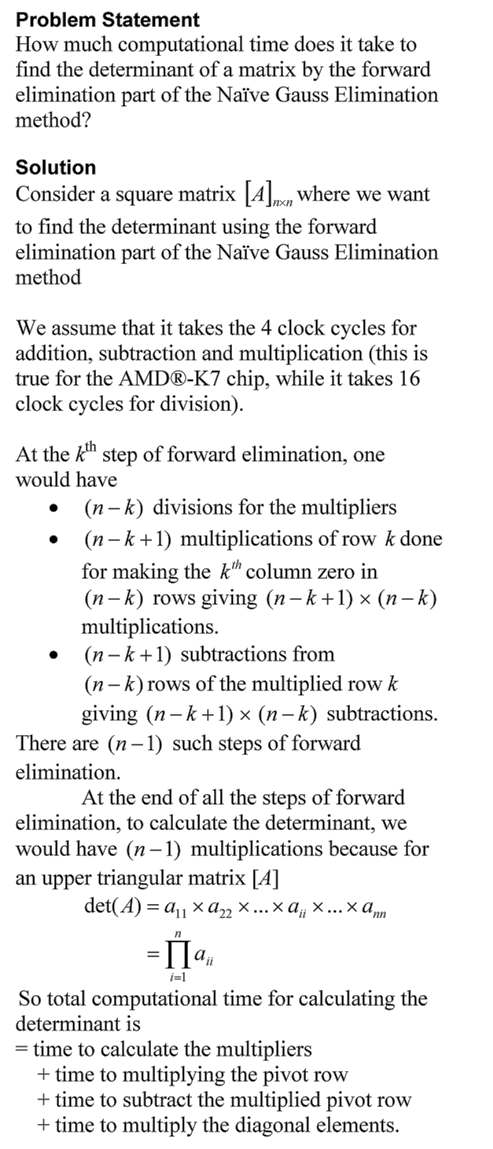
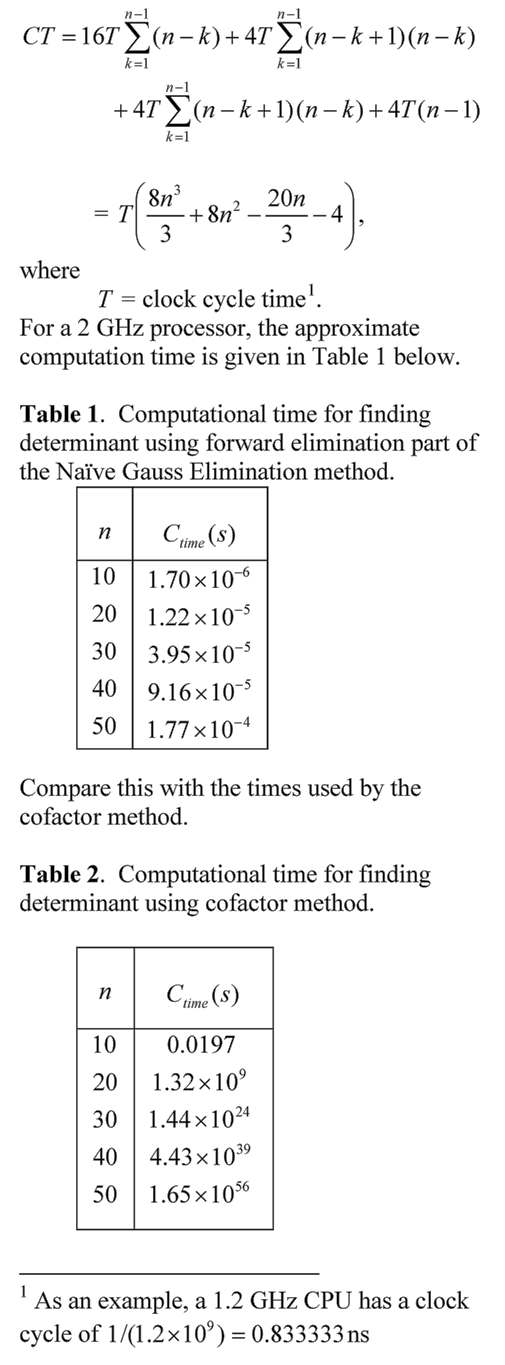
The time it would take to find the determinant of a matrix using the Gaussian Elimination is many-many orders less than when the cofactor method is used.  In this blog, we derive the formula for a typical amount of computational time it would take to find the determinant of a nxn matrix using the forward elimination part of the Naive Gauss Elimination method.  The time is compared with that using the cofactor method.
 Computational time to find determinant

Computational time to find determinant

This post is brought to you by Holistic Numerical Methods: Numerical Methods for the STEM undergraduate at http://nm.mathforcollege.com, the textbook on Numerical Methods with Applications available from the lulu storefront, the textbook on Introduction to Programming Concepts Using MATLAB, and the YouTube video lectures available at http://nm.mathforcollege.com/videos.  Subscribe to the blog via a reader or email to stay updated with this blog. Let the information follow you.

Does the solve command in MATLAB not give you an answer?

Recently, I had assigned a project to my class where they needed to regress n number of x-y data points to a nonlinear regression model y=exp(b*x).  However, they were NOT allowed to transform the data, that is, transform data such that linear regression formulas can be used to find the constant of regression b.  They had to do it the new-fashioned way: Find the sum of the square of the residuals and then minimize the sum with respect to the constant of regression b.

To do this, they conducted the following steps

  1. setup the equation by declaring b as a syms variable,
  2. calculate the sum  of the square of the residuals using a loop,
  3. use the diff command to set up the equation,
  4. use the solve command. 

However, the solve command gave some odd answer like log(z1)/5 + (2*pi*k*i)/5.  The students knew that the equation has only one real solution – this was deduced from the physics of the problem. 

We did not want to set up a separate function mfile to use the numerical solvers such as fsolve.  To circumvent the setting up of a separate function mfile, we approached it as follows.  If dbsr=0 is the equation you want to solve, use

F = vectorize(inline(char(dbsr)))
fsolve(F, -2.0)

What char command does is to convert the function dbsr to a string, inline constructs it to an inline function, vectorize command vectorizes the formula (I do not fully understand this last part myself or whether it is needed).

This post is brought to you by Holistic Numerical Methods: Numerical Methods for the STEM undergraduate at http://nm.mathforcollege.com, the textbook on Numerical Methods with Applications available from the lulu storefront, the textbook on Introduction to Programming Concepts Using MATLAB, and the YouTube video lectures available athttp://nm.mathforcollege.com/videos.  Subscribe to the blog via a reader or email to stay updated with this blog. Let the information follow you.